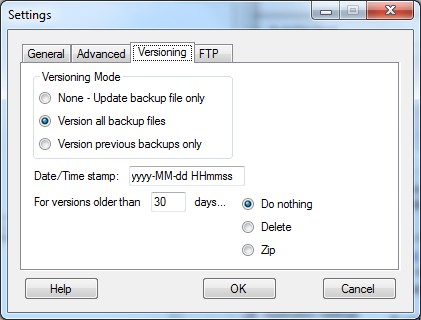
Versions Tab
The Versioning Mode can be set to one of 3 options:
None - A straight backup is done (the changed file is copied from the watch folder to the backup folder).
Version all - (default) All backup files have a time stamp added to their file names. Files will be stored in the default format of file.ext.YYMMDDHHMMSS.ext
Version previous - Similar to None where a straight backup is done, but before that occurs, the previous backup file is renamed to have a time stamp added to its filename.
You may customise the date/time stamp. The default is yyMMddHHmmss. To add some formatting, try yyyy-MM-dd HH-mm-ss. Note that the chars are case sensitive and follow the .NET format pattern rules. Slashes, colons and dots (/ \ : .) are not supported due to interfering with the folder path and filename structure. You can also use this formatting to restrict the versioning rate. If you only wish to save one version every hour, exclude the minutes and seconds (ie yyyy-MM-dd HH). Each change in the file is still backed up, but all of the changes in the same hour will overwrite each other (only latest version is kept for each hour is the result).
If you wish to delete or archive old versions of files, you can specify the minimum age for this to happen in the "For files older than ... days" box. If you do not wish to use this option select "Do nothing". Select "Delete" to delete those files. Select "Zip" to archive the old files to a file called BackupVersions.zip in the root of the backup folder. Regardless of the files age, the latest version is always kept.
See the "Notes on the Backup Engine" section for more information about what happens in a backup.
Copyright © 2007-2009, Hunter Beanland
Created with the Freeware Edition of HelpNDoc: Easy CHM and documentation editor